
Program Directors: Moodle Admins run a weekly report of "Uncategorized" activities in Gradebooks, to ensure that all scored activities are in the correct categories and count toward the course total.
- If you have uncategorized activities that should count toward the course total, move them into the correct category.
- If you have practice activities or other ungraded assignments without a category, create a new "Practice Activities" Category and move those activities into it. Do not use the current "Ungraded" category because it is hidden from students. If you put a practice activity in the Ungraded category, students can not see their results.
Note: If you have an uncategorized activity in a live course, you must also correct it in the Template version of the course.
Moving Grade Items into an Existing Category
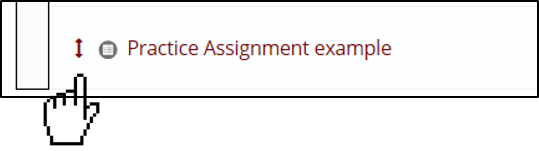
1. Click on the up/down arrow to the left of the title.
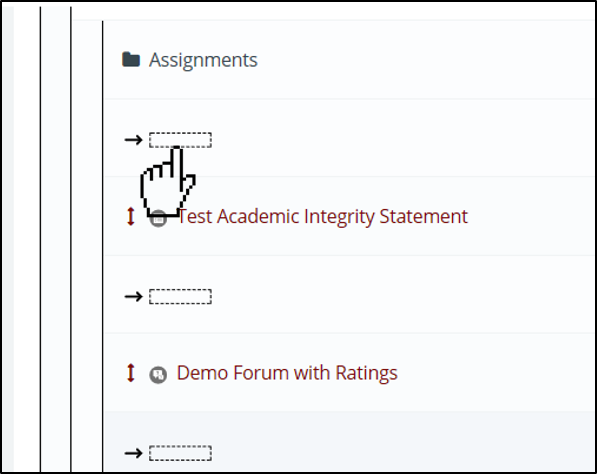
2. This will bring up the hierarchy chart showing where items are allowed to be placed. Navigate to the Correct section and click an open spot.
3. Click "Save Changes"

Setting Weight for Ungraded Activities.
Set the weight of an assignment to zero if you want students to complete the activity, but not have it count toward the overall grade.
1. Enable Edit Mode in the upper right corner of the window.
2. Click the Grades tab in the top navigation. From the dropdown menu, select Gradebook Setup.
3. Once in Gradebook Setup, scroll to the uncategorized actvity. Under the “Weight” column, make sure that the weight is set to “0.0” so that this assignment does not affect the students’ grades.

4. Click "Save Changes"
Comments
0 comments
Please sign in to leave a comment.